
SpecialRequest, on every device.
Free to start. One account on your phone, your tablet, your computer and the web.
Or pick your platform below
- Mobile app
iPhone and iPad
Create your events, follow the requests and let the app detect the songs you play.

- Mobile app
Android
The same app, on Android phones and tablets.

- Desktop app
Mac
The desktop app, with the Serato, rekordbox and VirtualDJ links.
- Coming soonDesktop app
Windows
The desktop app for Windows is on its way.

- Web app
Web
Nothing to install. Sign in from any browser and keep your requests on a big screen.

Grab your phone
Its camera reads this code and opens the App Store or Google Play, whichever your phone uses.
Your requests, next to your DJ software.
On your computer, SpecialRequest sits beside Serato, rekordbox or VirtualDJ and works with the music you already own.
- An automatic crate for every event in Serato, and a playlist in rekordbox
- The requests you already own are labelled In Serato or In your files
- Drag a request you own onto a deck, in any DJ software
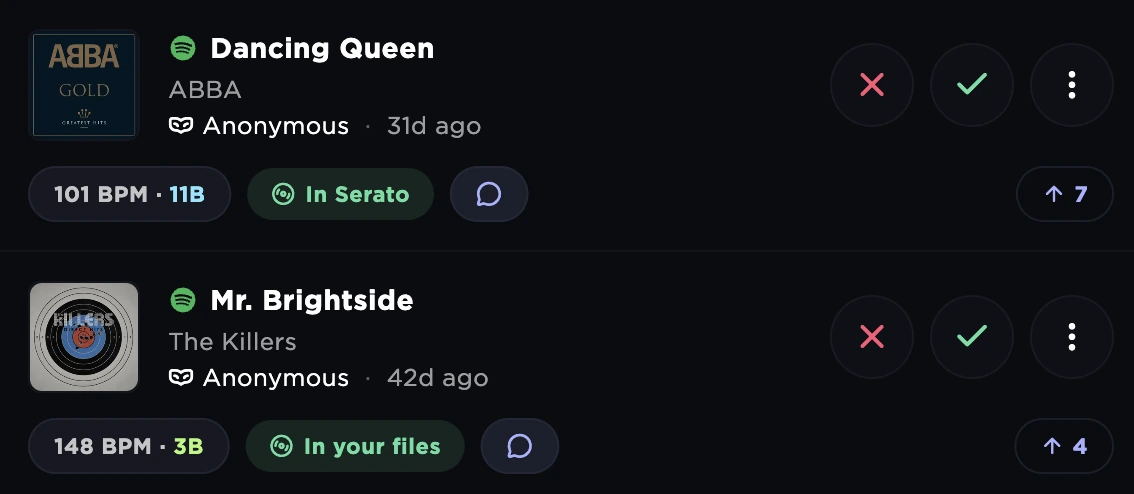
- Who asked, the tip, the votes, the BPM and the key of every request, always in view
- On a Mac, the app detects the songs you play by itself, no phone needed
SpecialRequest
Serato
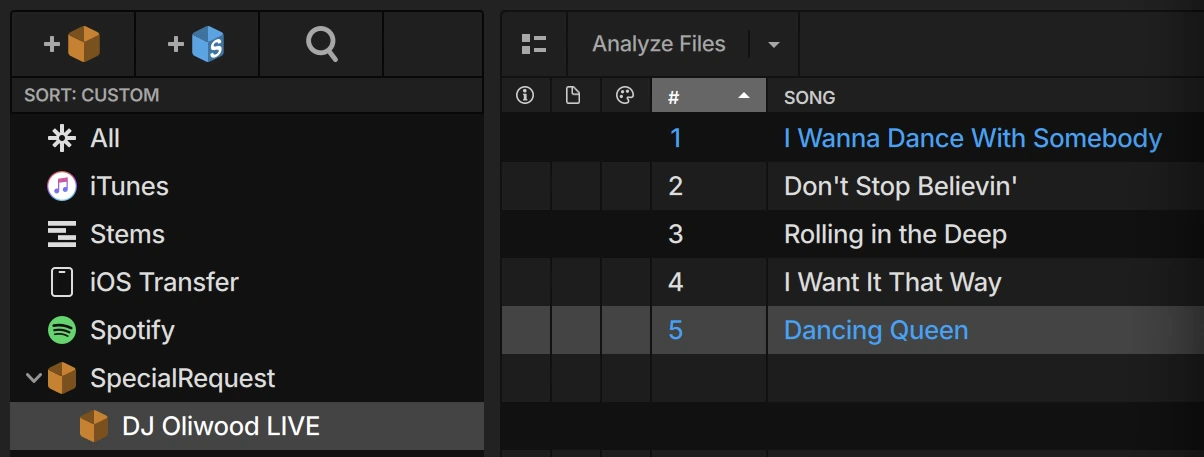
A crate per event
In Serato, and a playlist per event in rekordbox, filled as you accept.
What you already own
A label on every request whose song is in your library or your music folders.
Every detail in view
Who asked, the tip, the votes, the BPM and the key, beside your decks.
Three ways into your DJ software.
Use the link made for your software, drag your own files, or let a streaming playlist do the work.
- Direct links
Serato, rekordbox and VirtualDJ
Serato DJ Pro 4 or later gets a crate for every event, rekordbox a playlist for every event, and VirtualDJ shows your accepted requests in Ask The DJ, with who asked, the votes and the tip.
- Drag and drop
Any DJ software
Point the desktop app to your music folders, and the requests you own drag straight into Traktor, djay or any other software.
- Streaming playlist
Tidal or Apple Music
Your accepted requests go to a playlist on your own account, and Serato, rekordbox, VirtualDJ, djay or any DJ software using streaming syncs it automatically.




One account. Every device.
Keep the desktop app beside your DJ software and your phone in your pocket. Everything stays in sync, live.
Alerts in real time
A notification as soon as a request, a tip or a booking comes in.
Sort and filter
Order requests by votes or by time, and filter them by votes or by tip.
One-tap actions
Approve songs, turn others down and check off what's been played, without breaking your flow.
Your library, matched
On the desktop app, see which requested songs you already own.
BPM and key
Each request shows its tempo and its Camelot key, so you know what mixes in.
Always in sync
Move between iPhone, iPad, Android, Mac and the web without losing your place.
Made for every part of the night.
Stay close to your DJ software.
- Serato, rekordbox and VirtualDJ links
- Drag and drop into any DJ software
- Streaming playlist for Tidal and Apple Music
- Song detection without a phone
- A wide view, with every request on screen
Run the room from anywhere.
- Push notifications in real time
- Accept, decline and mark as played in one tap
- Song detection through the microphone
- QR code and share link always at hand
- Phones and tablets
The DJ software links, the streaming playlist, BPM and key, and song detection are part of Premium.
Download, sign up, go live.
Setting up your first event takes a few minutes.
- 1
Pick your app
Mac, iPhone, iPad or Android, or simply your browser.
- 2
Create your account
Sign up with your email. The same account works on every device.
- 3
Create your first event
Its QR code and its link are ready in a few minutes.
- 4
Connect your DJ software
Link Serato, rekordbox or VirtualDJ, or turn on the streaming playlist.
Your guests download nothing. They scan your QR code and request from a web page.
Your next night starts here.
Download the app and redefine your expectations.
- iPhone and iPadApp Store
- AndroidGoogle Play
- MacMac App Store
- WindowsComing soonMicrosoft Store
- Web browserOpen the web app
Grab your phone
Its camera reads this code and opens the App Store or Google Play, whichever your phone uses.